
Sent Campaigns (SMS and WhatsApp)
Campaigns that have been Sent will be listed under Sent Campaign.
You can view and download the details of sent SMS and sent WhatsApp campaigns, including the campaign creator, the sender (SMS sender ID or WhatsApp channel name), the subject (WhatsApp campaign name), total recipients, dates and times sent, and the campaign's message status.
The campaign's message status is shown below:
| Status | Description | Remark |
|---|---|---|
| Delivered | The total number of campaign messages that were successfully sent to recipients. | In WhatsApp and SMS Campaign |
| Read | The total number of campaign messages read by recipients. | In WhatsApp Campaign only |
| Replied | The total number of replies is due to clicks on the buttons or web links to the campaign message. The following are the criteria for the reply count for the "replied status". * Reply via buttons: The replies to the campaign message through multiple clicks on the button from the same recipient will be counted once only. * Reply via web links: One click on the web link from a recipient will be counted as one reply, and multiple clicks on the web link from the same recipient will be counted as multiple replies. | In WhatsApp Campaign only |
| Pending | The campaign message was successfully sent from CINNOX, but it is still waiting for a "Delivered" response from the 360dialog to the recipients. | In WhatsApp Campaign only |
| Failed | The total number of campaign messages that failed to send to recipients. | In WhatsApp Campaign only |
To search for submitted campaigns, type in the campaign name in the search box. Relevant results display on the campaign list.
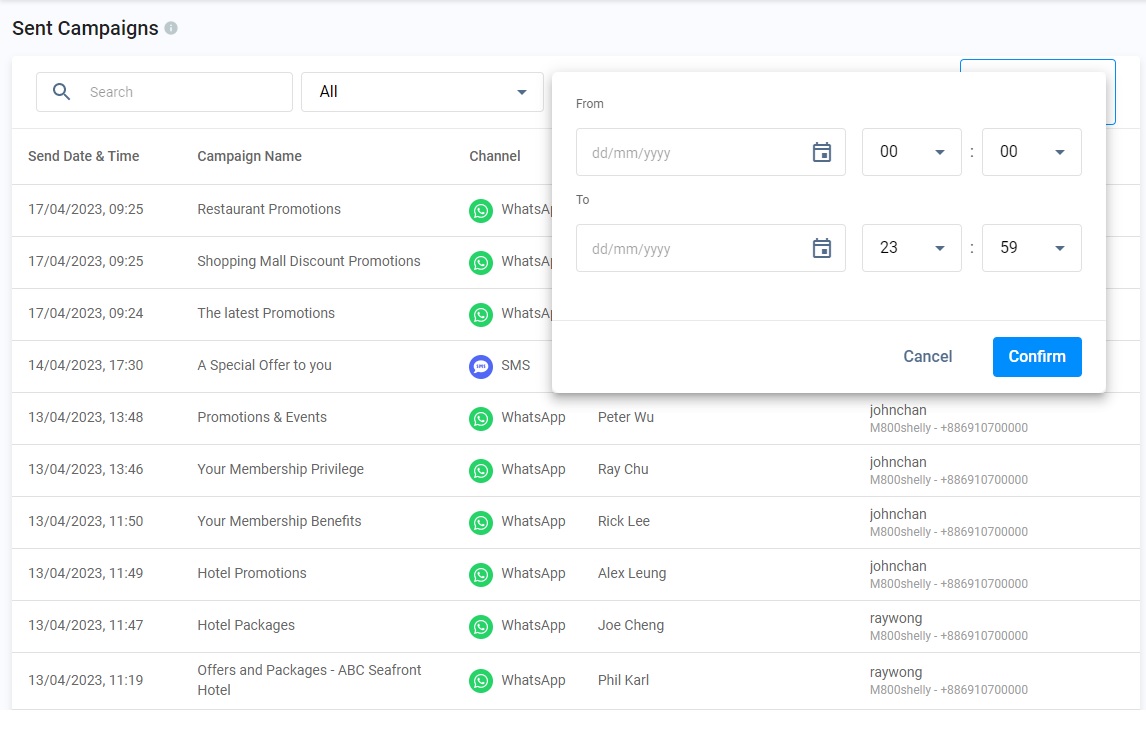
You can select one of the channel types of the Campaign, All, WhatsApp or SMS, or the following time frame to search your sent campaigns:
- All (All time)
- Today
- Yesterday
- Last 7 Days
- Last 30 Days
- Last 90 Days
- Custom
When you select Custom, you can set the date and time as your specific time frame for searching the sent campaigns.
Download Sent Campaign Details
To download the details of the sent Campaign,
- From the dashboard navigation pane, click Campaigns > Sent Campaign, and find the Campaign you wish to download the details.
- Click on the Download icon - zip file downloaded to your computer.
- Unzip and open the file to view the campaign details.

Important
📘
In CINNOX, a single (1) SMS is limited to 160 chars for English text while 70 chars for non-English text (universal code), E.g., Chinese and Japanese scripts.
If the SMS text exceeds the single SMS limit, it splits into smaller messages for transmission.
A. SMS with English chars > 160 splits into 153-char per sent.
E.g., SMS with 161 chars - will be sent as 2 SMS, first with 153 chars and the second with 8 chars.B. SMS with non-English chars > 70 splits into 67-char per sent.
E.g., SMS with 71 chars - will be sent as 2 SMS, first with 67 chars and the second with 4 chars.
- When an SMS is combined with English and non-English chars, 1 non-English char is regarded as non-English text.